
Hello Everyone, recently UIDAI has changed the password of Aadhaar PDF File.
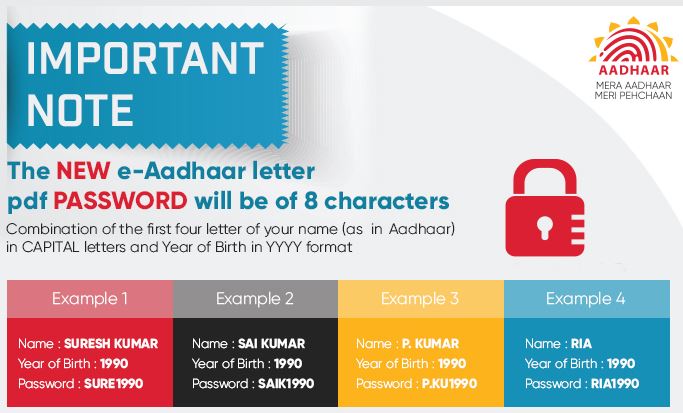
Table of Content
The Problem
Earlier the EAadhaar PDF Password as PIN code. Our First Software would randomly generate 6 digit number and try out different passwords with the file. Our Core PDFCracker application is able to search about 27000 Words per Second. So We did some math i.e 6 digit character with 10 possible characters per digit [0 to 9 ] so we needed 10^6 = 1000000 combinations. Wo In Worst case scenario it would take about 1 minute to crack the password. Not A Problem. But we came up with better idea, we created the list of all the possible PINCODES of India, which were roughly 20000 word list, so with our core pdfcrack we were able to get password in just under 1 Second.
But the real problem is infront of us, the new Password policy has 8Character password which is 4 English Alphabet and 4 Numeric Characters. So mathematically if we perform permutation we would have to deal with 26 x 26 x 26 x 26 x 10 x 10 x 10 x 10 = 4569760000 Combinations. Thats quiet a big problem. Even if we search the list at 27000 Words per Second, to find a password through such a big list would take us Approx 169250 Seconds i.e Approx 2820 Minutes or We can say about 48 hours. ie. about 2 Days. 😨
So If we go all caveman style at the password, surely we can break it but it would take 2 days of your computing time. Now lets see the solution that we came up with.
The Solution
First We break the password in two parts Alphabet Part and Year of Birth Part. XXXX | 9999
Now We dont have to put a lot of stress on the Year of birth as the year of birth is always between 1900 and Current Year that is 2026 , so we have just 117 numbers. So now we have just 26 x 26 x 26 x 26 x 117 = 53466192 Combinations as compared to earlier 4569760000 this number is quiet reachable. As per our pdfcrack we can crack this password in just 1980 seconds ie in 33 Minutes.
But that too is quiet long time. But When we download the Aadhaar PDF File we mostly knows the name of enrollee, not exactly the spelling but some hint of name and possible age. So we punch in the spelling and Possible age. that would reduce the combination to even a very small figure, say we know 10 possible alphabets in the name then our combination list would be dropped to 10 x 10 x 10 x 10 x 50 = 500000. 😀
Thats quiet reachable, with our algorithm we can crack that pdf file password in about 1 minute. Not A Big Problem
Installation
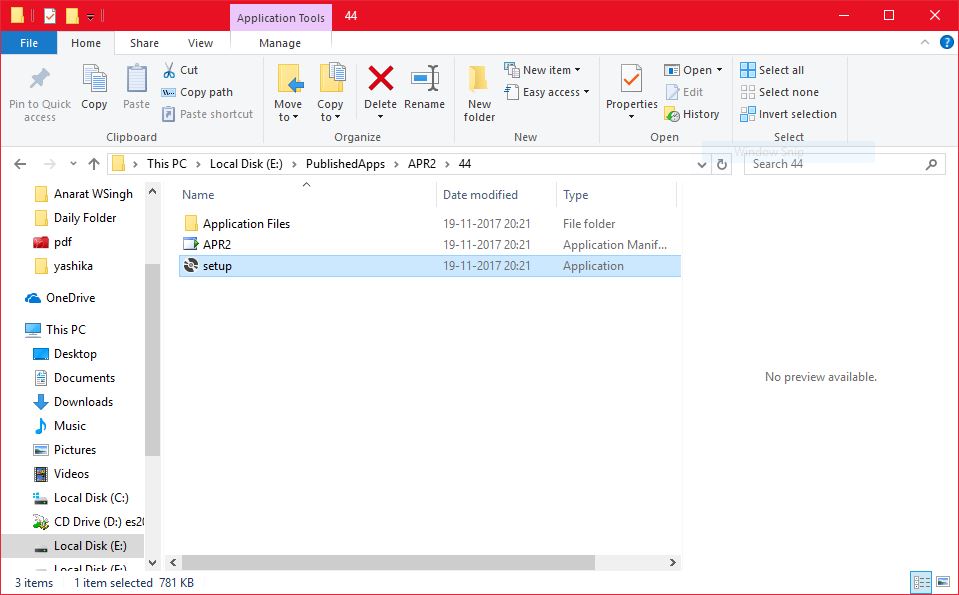
Installation is super easy. Just Click here to download the software. Then Unzip the file and run setup.exe
- Once you click the link you will be redirected to Google Drive from where you can download the zip file.
- Then you must extract the zip file on your computer.
- There You will see 2 files and a folder. You must right click setup.exe and run as administrator.
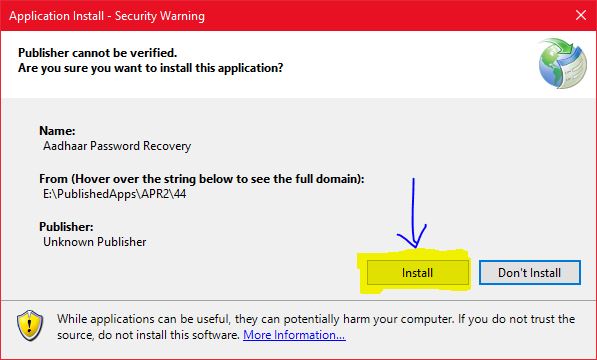
Done! You just installed our software
Software Layout

We try to keep things as simple as possible. There are not many buttons, you are given with minimum options so even amatures who never used software can use software very easily. First you have Menubar
- File Menu
- Open File -> Here You can select the file.
- Exit -> Just Exit the Application
- Licence Manager
- Login -> This is where you insert your Username and Password
- Status -> Click here to know your Licence Count
- Purchase LIcence -> From here You will be redirected to our software purchase page
- Help
- Check for Update -> Click here to Get information about any latest Version
- Verify Dependencies -> Click here to test if software is installed successfully
- How to Use -> Click here to Open up this manual
- About us -> Provides some information of the software
Now we have Four Buttons on Screen
- Select PDF -> Click this button to Select the PDF File you want to unlock. Make sure you only select files that are downloaded from eAadhaar portal or using Aadhaar Software. Other files might not be supported. And also the file must be located on Local Computer Network Files are not supported
- Find Password Button -> This button is activated once you have selected the file to crack and selected the appropriate method for cracking the file password.
- Show Password Button -> Once the password is cracked, you can use this button to see the password. This buttons checks if you have valid licence key and then shows you password.
- Copy Password -> This button is activated once you have seen the password. Click here to copy the password to clipboard.
Cracking Method
There are four cracking method.
- Find Pincode (Old Method) This is for old files that you may still have. It finds the pincode of eAadhaar PDF file. This method no longer works for new File. We will have this method for some time now.
- Find Year of Birth This method will work if you know the name of the resident. For Example The name of the owner of the file is RAMESH provide the name in the Name field and the software will give you the password. Very easy and super quick.
- Find Name with given Letters This method uses different alphabets provided by User to find the password. You have to provide alphabets to computer to create a name for example: RAMESH will be used to create Passwords like RAME, RAMS, RAMH, HARE, SEMR, SASH etc. this option will create all the possible combinations of the name from the given characters and give you the password. But you must know the approx age and possible characters in the name to create the password.
- Find both name and Age This letters automatically searches all the possible name and all possible age for the password. This option might take a lot of time to find password depending on the speed of your computer.